
Table of Contents
What Does a Payslip Look Like?
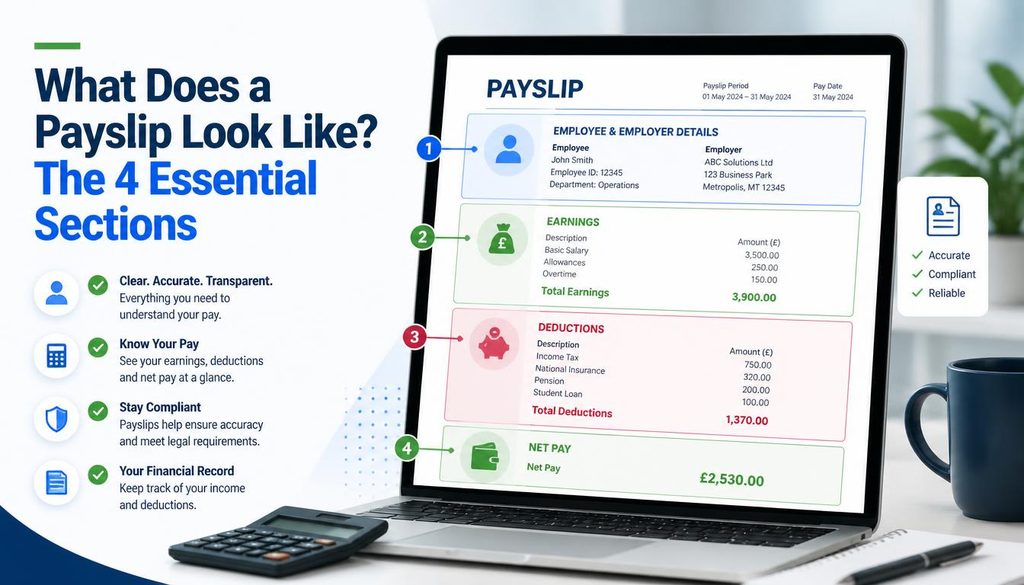
| Quick answer: A payslip has four main sections employer details at the top, employee details below that, an earnings table, and a deductions table. Net pay appears at the bottom as gross pay minus total deductions. See the full field by field breakdown below, then create your own payslip in under 60 seconds at techtester.online/payslip generator/ |
The four sections of every payslip
Every professional payslip whether printed by ADP, generated by software, or created manually contains the same four sections. Understanding what each section looks like helps you verify that any payslip you receive or create is complete and correct.
Section 1 Employer information (top of payslip)
The top section identifies the company issuing the payslip:
- Company name usually displayed prominently in the header, often with the company logo
- Company address full postal address including city, postcode, and country
- Company registration number required in the UK and many other countries
- Contact details email or phone for payroll queries
Section 2 Employee information
Below the employer section sits the employee identification block:
- Employee full name
- Employee ID or payroll number the unique identifier the employer uses for this employee in their system
- Job title and department
- Pay period the start and end dates of the period covered by this payslip
- Payment date the date the payment was or will be made
- Tax code or reference number required in the UK, US, India, and Pakistan
Section 3 Earnings table
The earnings table lists every component of what the employee earned before deductions:
- Basic salary the fixed monthly or annual salary divided by the number of pay periods
- Overtime pay additional hours multiplied by the overtime rate
- Bonus one time or performance based additional payment
- Housing allowance common in Pakistan (45% of basic), UAE, and Saudi Arabia
- Transport or conveyance allowance common across South Asia and Middle East
- Medical allowance common in Pakistan and India
- Commission for sales roles paid on performance
- TOTAL GROSS PAY the sum of all earnings before any deductions
Section 4 Deductions table
The deductions table lists everything subtracted from gross pay:
- Income tax or PAYE calculated from gross pay using the applicable tax rate
- National Insurance or social security employee contribution percentage
- Pension or provident fund contribution employee portion
- EOBI in Pakistan, 1% of basic salary
- Health insurance premium employee portion of employer provided health coverage
- Loan repayment deduction for salary advance or employee loan
- TOTAL DEDUCTIONS the sum of all deductions
- NET PAY gross pay minus total deductions this is the amount actually paid to the employee
Year to date figures
Many payslips include a year to date (YTD) column alongside the current pay period figures. YTD shows cumulative totals from the start of the financial year useful for tax reconciliation and annual income verification. UK payslips commonly include YTD. US pay stubs almost always include YTD. Pakistani salary slips less commonly include YTD but it is good practice.
What a payslip looks like in different countries
UK payslip format
A UK payslip typically uses the format: employer name and address at top, then employee name and payroll number, National Insurance number, tax code, pay period and payment date, itemised earnings, itemised deductions including PAYE tax and National Insurance contributions, and net pay. The employer is PAYE reference number often appears in the footer.
Pakistan salary slip format
A Pakistan salary slip shows company name, employee name and designation, CNIC number, department, basic salary, house rent allowance (typically 45% of basic), medical allowance, conveyance allowance, then deductions including EOBI (1% of basic), income tax, and any other deductions. Net salary appears at the bottom. Larger companies also show the employer EOBI contribution (5% of basic) for transparency.
US pay stub format
A US pay stub typically shows employer name and address, employee name and Social Security Number (last four digits), pay period, hours worked, hourly rate or salary, gross wages, federal income tax withheld, state income tax withheld, Social Security tax (6.2%), Medicare tax (1.45%), any other deductions, net pay, and year to date figures for all categories.
Create a payslip that looks exactly like these examples
The TechTester free payslip generator at techtester.online/payslip generator/ produces a payslip containing all sections described above employer details, employee information, itemised earnings, itemised deductions, and net pay calculated automatically. Add your company logo, select your currency, and download a clean professional PDF in under 60 seconds. No account, no watermark.
FAQ
A payslip has four sections: employer details (name, address, logo) at the top, employee details (name, ID, job title, pay period) below, an earnings table listing all pay components, and a deductions table showing tax and other withholdings. Net pay gross minus total deductions appears at the bottom.
A payroll ledger is a business accounting record tracking all payroll transactions across multiple employees and pay periods. Unlike a payslip (issued to one employee for one period), a payroll ledger is an internal record listing every employee, their gross pay, deductions, and net pay for each pay period used for bookkeeping and tax filing.
A US pay stub shows employer and employee information, pay period dates, hours worked, gross wages, itemised deductions (federal tax, state tax, Social Security 6.2%, Medicare 1.45%, and any other deductions), net pay, and year to date totals for all figures.